Overview
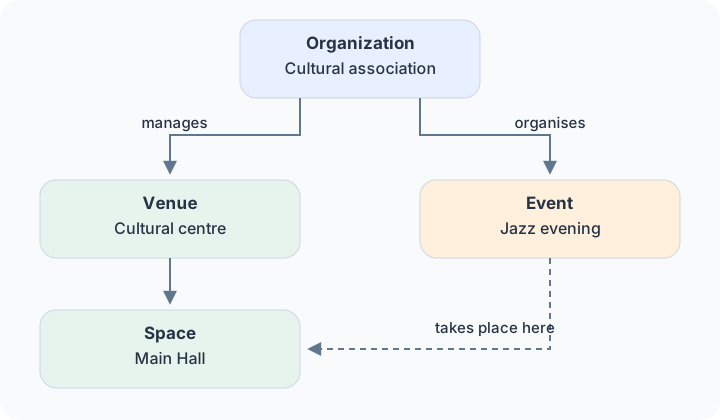
With kulturbytes, you can make your events and cultural offers visible. Start with your organization, add venues and spaces, and then create your events.
Organization
Your organization is the starting point. It can be an association, a museum, an initiative or you as an individual organizer. Here you keep your contact details and manage your offers.
Venues and spaces
A venue is a place where events happen, such as a cultural centre. A space is a specific area within it, such as the main hall.
Create each venue and space once. You can then use them for many events without entering the address again.
Events
An event describes an offer, such as a concert. Add a venue, a space if needed, and one or more dates.
For example, you can create a jazz evening at a cultural centre and select the main hall as the space.
Partnerships
Organizations can work together, for example as partners or sponsors.
Users and teams
Several people can help maintain the information. Each person uses their own account. Teams group people who work together.
Portals
A portal shows selected events, for example for a region or audience. You continue to keep the information up to date in kulturbytes.
Next, create your user account or read more about organizations.